CYBERLAB
Security Tooling & Detonation Lab
● Active1. Snapshot
2. Why I Built This
In cybersecurity, you need a place where:
- Compromise is expected – Breaking things is the goal, not a disaster
- Real malware can be safely detonated – Complete network isolation from production
- Security tools can be tested – Validate before recommending to clients
- Detection capabilities can be measured – See what tools actually catch vs. marketing claims
- Rebuilds are routine – Snapshot, detonate, analyze, revert, repeat
CyberLab exists because I needed an environment completely separate from my personal network where I could safely run suspicious binaries, test security tools, capture network traffic during attacks, and generate documentation without risk.
This lab is air-gapped and isolated. Malware samples are handled in contained environments with snapshot-based recovery. Network traffic never touches production systems.
3. What This Lab Looks Like
Detonation Hosts
Isolated Windows and Linux VMs configured for safe malware execution. Each VM has clean snapshots for quick recovery after analysis sessions.
Security Monitoring (Wazuh)
SIEM and XDR platform monitoring detonation hosts. Captures endpoint telemetry, analyzes behavior, and generates alerts during malware execution.
Network Capture & Analysis
PCAP collection on isolated network segments. Captures C2 communication attempts, DNS queries, and lateral movement traffic for post-detonation analysis.
Tool Testing Environment
Dedicated space to evaluate security tools before client deployments. Test detection capabilities, performance impact, and false positive rates in controlled scenarios.
Virtual Networks
Segmented networks simulating corporate (victim), internet (attacker), and detonation zones. Allows realistic attack path testing while maintaining isolation.
4. How I Use(d) It
Real-world use cases for this lab:
- Malware detonation: Safely execute suspicious binaries and manually observe behavior, registry changes, network calls, and persistence mechanisms
- Tool validation: Test security tools to see which actually detect threats vs. which just have good marketing
- PCAP analysis: Capture network traffic during attacks to understand C2 communication patterns and exfiltration techniques
- Documentation generation: Screenshot attack chains, detection alerts, and analysis workflows for reports and personal reference
- Detection engineering: Develop and test custom detection rules against known malware samples
- Incident response rehearsal: Practice IR workflows in realistic but safe scenarios
This lab is where theory becomes practice. When I need to understand how a specific attack works, or whether a security tool will actually catch something, I fire up CyberLab and find out.
5. Screenshots / Artifacts
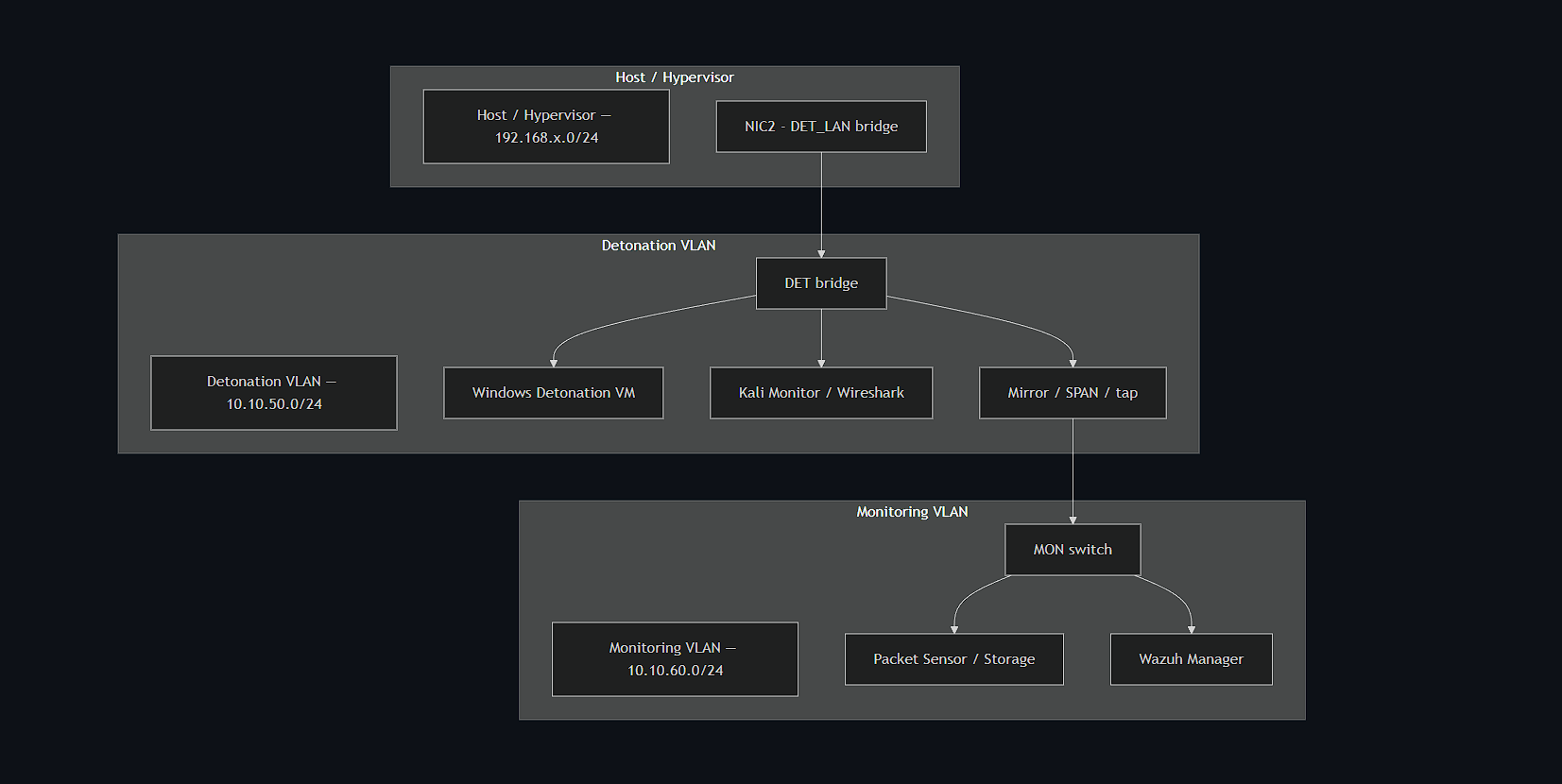
Lab architecture includes: OPNsense firewall controlling VLANs, libvirt/KVM virtualization, detonation VLAN (Windows sandbox), monitoring VLAN (Kali, Wazuh manager, Linux sensor), and complete network isolation from production systems. Screenshots of live malware analysis are not published for security compliance.
6. Links
CyberLab GitHub RepositoryLab documentation includes detonation runbooks, safe handling procedures, firewall rules (OPNsense), and artifact collection scripts. Environment runs fully isolated from production networks.